
Deleting your Opionate account is a deliberate, permanent action, and the process is built specifically to make sure it's something you genuinely meant to do - not something that happens by accident from a single misplaced click deep in a settings menu. This guide covers where to find the option, what the confirmation step actually requires, and what's worth thinking through before you go ahead with it.
Where to Find Account Deletion
The option to delete your account lives in your account settings. It's intentionally not placed alongside routine, everyday settings changes, since it's a fundamentally different kind of action from adjusting a preference or updating a detail on your profile.
What the Confirmation Step Requires
Account deletion requires an explicit confirmation step beyond a single click - you'll need to type the word "DELETE" to confirm you understand the action is permanent, along with verifying your identity in a way that matches how you originally signed in (your password, if you signed up that way, or your linked Google account, if that's how you access Opionate). This two-part confirmation exists specifically to prevent an accidental deletion - a single stray click, or someone else briefly at your keyboard, isn't enough on its own to delete an account.
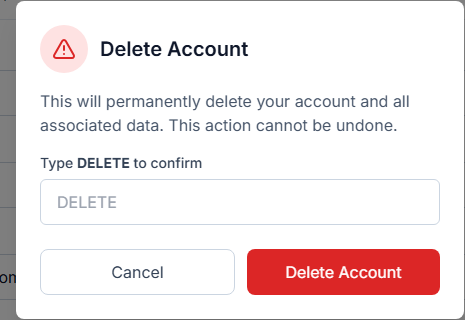
The confirmation step - typing DELETE is what stands between a misplaced click and an actual deletion.
What to Think About Before You Delete
Because deletion is a permanent action, it's worth pausing on a few things beforehand. If you have survey data, dashboards, or exported reports you might want later, make sure you've genuinely retrieved anything you need before proceeding - once your account is deleted, that data won't be accessible to you afterward. If your credit balance still has unused credits, factor that into your decision as well, since a deleted account isn't a state you can simply reactivate to pick back up where you left off. If you're deleting the account because of a specific frustration or a temporary need to step away rather than a genuine, permanent decision to stop using the platform, it's worth considering whether simply not using the account for a while accomplishes the same goal without the permanence.
FAQ
Can I recover my account after deleting it?
Account deletion is designed to be permanent - treat the decision as final rather than assuming a recovery path will be available afterward.
What happens to my surveys and response data when I delete my account?
Your account and its associated data are removed as part of the deletion process - if you need any of your survey data, dashboards, or exports for your own records, retrieve them before completing the deletion.
Do I need to cancel anything separately before deleting my account, like a payment method?
Since credit purchases are one-time transactions rather than a recurring subscription, there's no separate ongoing payment to cancel beforehand - see our guide on how credits work for more on how billing is structured.
What if I signed up with Google - does deletion work the same way?
Yes - the confirmation step verifies your identity using whichever method you originally signed in with, Google sign-in included, alongside the typed confirmation.
For more on your account and billing, see Managing Your Account Login and Understanding Your Credit Balance and Transaction History.