
Opionate sells AI credits directly, on a pay-as-you-go basis, rather than locking you into a recurring subscription tier. If your balance is running low, or you know an upcoming project is going to lean heavily on AI-assisted features, buying more credits is a straightforward, one-time purchase you can make whenever you actually need it - not a plan change or a commitment to a higher recurring cost going forward.
Starting the Purchase
From your billing settings, you can initiate a credit purchase directly. Checkout is handled through PayPal, so you'll complete the actual payment step within PayPal's own secure flow rather than entering payment details directly into Opionate - a familiar process if you've bought anything else through PayPal before, whether you're paying with a PayPal balance, a linked bank account, or a card through PayPal's guest checkout.
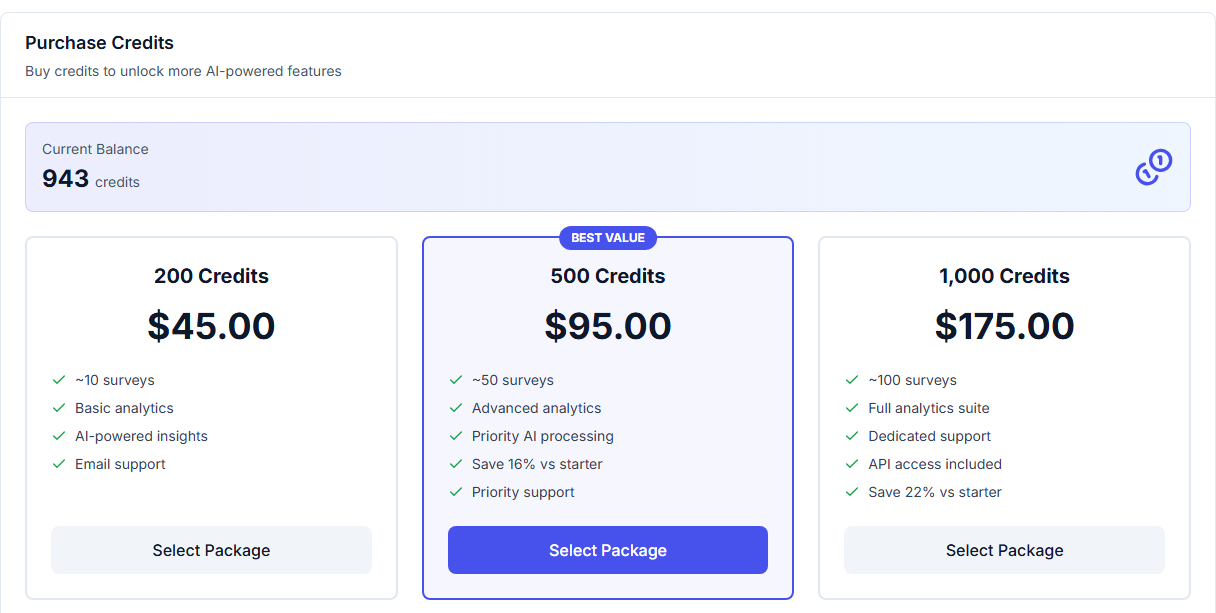
Current balance and available packages in one place - credits are added instantly once payment completes.
What Happens After Payment
Once PayPal confirms your payment, your credit balance updates immediately - there's no waiting period or manual review step between completing checkout and having the credits available to use. The purchase also generates a receipt, both viewable directly on the platform and sent to your account's email address, which our guide on finding and downloading your payment receipts covers in more detail. Your new balance and the purchase itself will also appear as a line item in your transaction history, the same place any credit-consuming action shows up.
If a Payment Doesn't Go Through
If a PayPal payment fails or gets interrupted partway through - a declined card, a closed browser tab mid-checkout - no credits are added to your balance, and you won't be charged for an incomplete transaction. If you're ever unsure whether a purchase actually completed, checking your transaction history is the most reliable way to confirm - a successful purchase will show up there immediately, and if it doesn't appear after a reasonable wait, it's safe to assume the transaction didn't go through and can be retried.
FAQ
Do I need a PayPal account to buy credits?
PayPal's checkout flow supports paying with a card as a guest in many cases, without requiring a full PayPal account, though having one makes the process faster if you already do.
How quickly do credits appear in my balance after purchase?
Immediately after PayPal confirms the payment - there's no delay or manual processing step on Opionate's side.
Is buying credits a subscription, or a one-time purchase?
A one-time purchase - you're topping up your balance, not signing up for a recurring charge. You control if and when you buy more.
What should I do if I was charged but don't see the credits in my balance?
Check your transaction history first to confirm whether the purchase is recorded there. If a charge appears on your PayPal account but not in your Opionate transaction history, reach out to support with your PayPal transaction details.
For more on how your balance behaves and what it's used for, see Understanding Your Credit Balance and Transaction History and What Actually Consumes Your Credits (and What Doesn't).