
Drafting Surveys with Claude
Once you've connected Opionate's authenticated MCP connector (see Connecting Opionate to Claude via MCP), you can ask Claude to build or edit a survey draft directly - no copy-pasting a generated structure into the builder afterward. This works for both survey types: Classic Survey and the section-based Advanced Survey.
Classic Survey
Classic Survey drafting covers the same ground as Opionate's in-app "Generate with AI" feature, plus a few things only available through Claude:
- Whole-survey authoring - describe what you're researching, and Claude drafts a full structure: sections, questions, question types, logic.
- Granular editing - add, update, delete, or reorder individual questions without regenerating the whole survey. This level of control isn't available anywhere in the workspace UI itself - it's MCP-only.
- Undo history - every AI-assisted edit is saved as a version, the same history mechanism the workspace UI itself uses (see Autosave and Version History). Ask Claude what changed recently, or ask it to revert to an earlier version. Reverting is two-phase: Claude previews exactly what would change first, and only commits once you've actually agreed to it - it won't restore a version without confirming with you in between.
A typical conversation might look like: "Create a draft survey about remote work satisfaction, aimed at software teams, with a mix of rating scale and open-ended questions." Claude drafts it, you review it in the workspace, and you can keep iterating - "add a screening question that disqualifies anyone who's fully in-office" - without starting over.
Every structure Claude produces goes through the exact same validation Opionate's workspace UI enforces - question-type field rules, section rules, display logic constraints. Claude can't save something the builder itself would reject.
Advanced Survey
Advanced Survey - the section-based survey type with Stimulus, Pairwise Comparison, Sequence Flow, and First-Click Test sections - has its own set of drafting tools:
- Create a new Advanced Survey draft.
- Add, update, delete, or reorder a section of any kind: Stimulus, Pairwise Comparison, Sequence Flow, First-Click Test, or a plain Questions section.
- Attach or detach images in a Pairwise Comparison section's image pool.
A section's ordinary questions (including the hidden result question every Pairwise Comparison, Sequence Flow, or First-Click Test section has) are edited using the same question tools as Classic Survey - the two tool families work together on the same draft. For example: "Add a Pairwise Comparison section comparing these five logo concepts" followed by "now add a follow-up open-ended question asking why they picked the winner."
Undo history works here too. An earlier version of this connector didn't support reverting an Advanced Survey's section structure - that gap is closed now. Restoring a version reconciles both the question list and the section structure together (which section holds which questions, zone or image data, and so on), so a restore can't leave a section pointing at something that no longer exists. The same two-phase preview-then-confirm flow applies here as it does for Classic Survey.
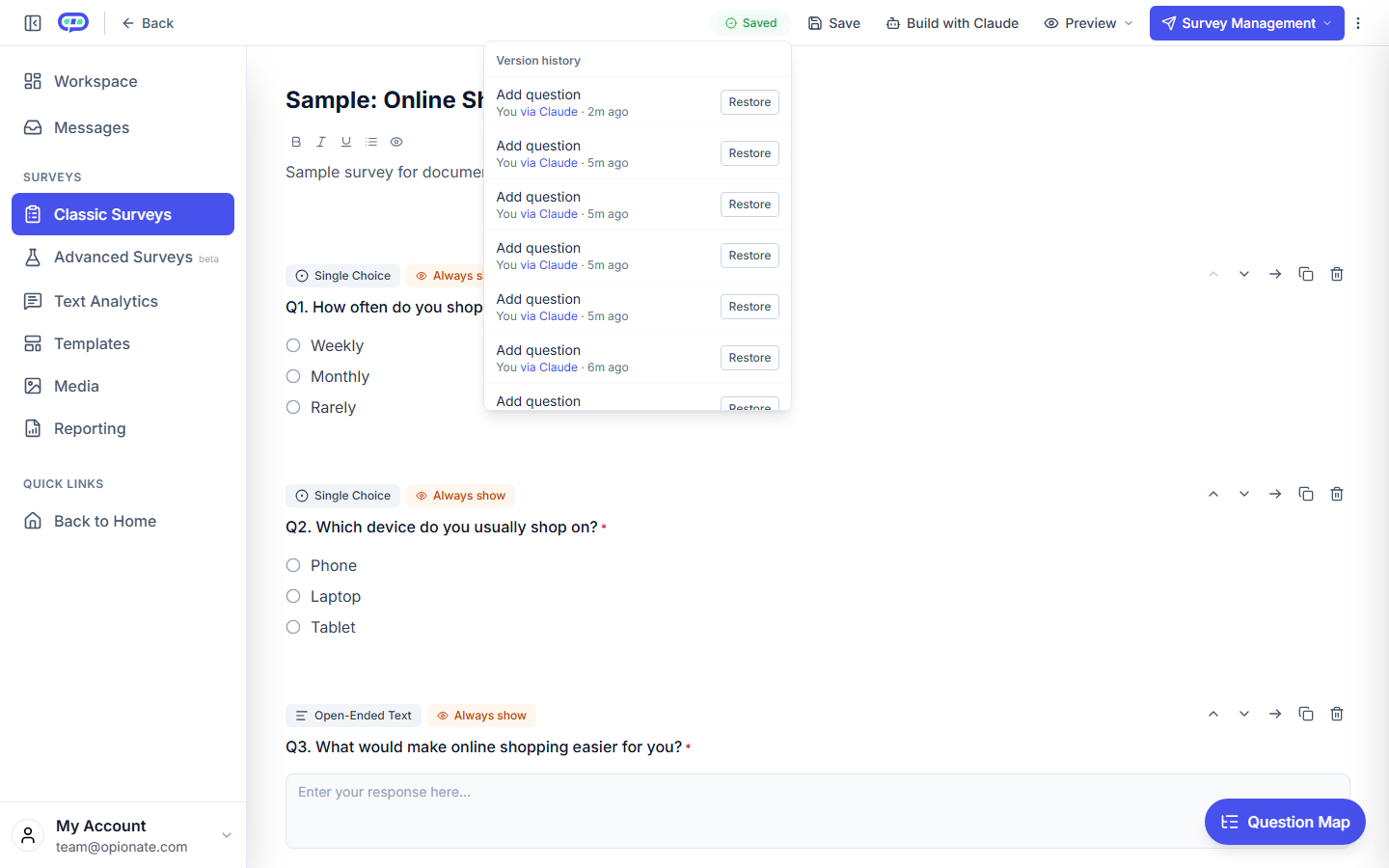
Every AI-assisted edit is saved as its own version, attributed “via Claude” - restorable the same way any other version is.
Attaching Images
If a section needs images - a Pairwise Comparison pool, a Stimulus section's media, a First-Click Test's target image - Claude can reference images that are already in your Media Library, but can't upload new ones itself. See Referencing Your Media Library with Claude for how that works in practice, including why AI-driven upload isn't offered.
FAQ
Can Claude publish the survey once it's drafted?
No - drafting and editing are all Claude can do through this connector. Publishing stays a workspace action you take yourself, after reviewing the draft.
Can I switch a survey between Classic and Advanced after Claude creates it?
That follows the same rules as any other survey - check the workspace builder for what's supported, since this isn't something specific to AI-assisted drafting.
Does Claude see my other surveys while working on one?
Claude can look up and list your own surveys if you ask it to, but every edit is scoped to the specific survey you're working on - nothing happens to another survey unless you explicitly ask.
Can I restore a version Claude made from the browser, or vice versa?
Yes - every version, whether made through Claude or directly in the browser, lives in the same history and can be restored from either side. See Restoring a Previous Version of Your Survey for the browser-side walkthrough.
What happens if I ask Claude to do something the platform doesn't support?
The same validation that protects the workspace UI applies here too - an unsupported request gets rejected with an explanation rather than silently saved in a broken state.
Ready to add visuals? Continue with Referencing Your Media Library with Claude.