
Improving Employee Experience (EX) is no longer just a Human Resources (HR) trend; it is a core business strategy for retention and productivity. In the competitive landscape of 2026, companies are realizing that the cost of replacing an employee, often 1.5x to 2x their annual salary, is far higher than the cost of listening to them.
However, many leaders struggle with surveys that feel more like a chore than a growth driver. When surveys are poorly designed, they result in "data noise" rather than "data signals." This guide provides an expansive, actionable framework to conduct surveys that employees actually want to answer and leadership can actually use.
Onboarding
Day 7, Day 30, and Day 90 - capturing the new-hire experience while it is still fresh.
Role Transitions
Right after a promotion or a department move, before the adjustment settles in.
Organizational Change
Right after a merger, a leadership change, or a major project wraps up.
1. The Strategic Shift: When Is the Best Time to Launch Your EX Survey?
The most common mistake in modern HR is relying solely on the "Annual Engagement Survey." By the time you analyze data from six months ago, the workplace sentiment has already shifted. People have left, teams have changed, and the "bottlenecks" of last year are no longer relevant. To be truly efficient, you must transition from a post-mortem mindset to a real-time diagnostic approach.
The Rise of Pulse Surveys and "Moments that Matter"
The answer lies in Pulse Surveys. Instead of one massive questionnaire that takes 30 minutes to complete, deploy short, 2-minute check-ins monthly or quarterly. These provide a "weather report" of your company culture, allowing you to catch issues before they turn into resignations.
Additionally, you must trigger surveys during critical "Moments that Matter." These are high-impact milestones in the employee lifecycle, such as:
* Onboarding: Day 7, Day 30, and Day 90.
* Role Transitions: Immediately after a promotion or department move.
* Organizational Change: Following a merger, a leadership change, or a project completion.
This ensures you are capturing "hot data" while the experience is fresh and the feedback is still actionable.
For a deeper dive into streamlining your new hire experience, check out our full guide on How to Design an Automated Onboarding Survey: The Modern HR Leader’s Guide to Employee Retention.
Scaling Without Burnout: Prompt-to-Survey
While this "always-on" strategy sounds like a heavy HR workload, Opionate streamlines it with our Prompt-to-Survey feature. Most HR managers spend days debating question phrasing. Now, you can simply type a request, like "Create an onboarding survey regarding role clarity and culture fit", and the AI generates a complete draft instantly. It provides a professional sample for your reference that you can easily customize, turning hours of manual design into seconds of simple direction.
2. High-Signal Design: How Do You Design Questions That Yield Actionable Data?
Efficiency in EX surveys isn't about the number of questions, but the depth of the answers. A standard "Rate 1-10" scale provides the "What"-allowing you to track trends and benchmark departments-but it often fails to capture the "Why."
The Synergy of Quantitative and Qualitative Data
By combining Quantitative Ratings with Qualitative Follow-ups, HR teams gain a holistic view of the workplace. Quantitative data is great for the boardroom (charts and graphs), but qualitative data is great for the manager’s desk (real stories and specific complaints).
This dual-layer approach bridges the gap between cold statistics and human sentiment. It ensures that leadership isn't just reacting to a drop in scores, but understands the specific root causes driving those numbers. For example, a low "Work-Life Balance" score might be caused by too many meetings for one team, but by a lack of remote-work equipment for another. Without the qualitative "Why," you might apply the wrong solution.
Intelligent Conversations with AI Follow-ups
To make this balance effortless, Opionate utilizes AI to automatically generate a tailored mix of both question types. For the open-ended portions, our tool features AI Follow-ups-smart, adaptive prompts that evolve in real-time based on a respondent’s specific input.
Instead of a static "Any other comments?" box, the AI acts as a digital interviewer. If an employee indicates they feel disconnected from the company, the AI might instantly trigger a follow-up asking: "Which specific communication channel do you feel is least effective?" Therefore, you capture surgical-level clarity and actionable context without having to manually program complex branching logic yourself.
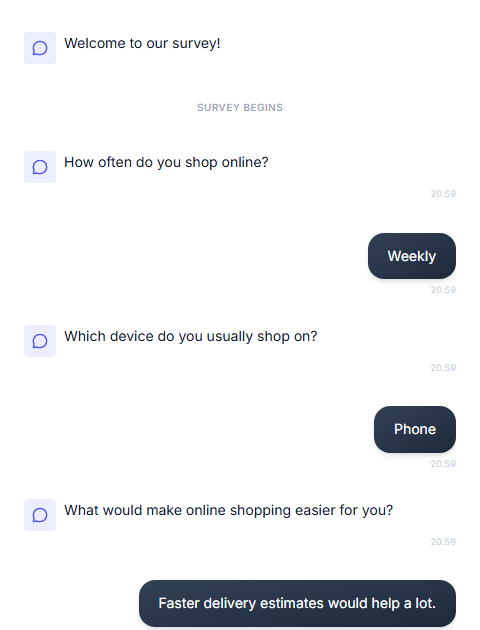
Opionate's chat-based take experience - one question at a time, in a natural, texting-style flow.
3. The Delivery Channel: Completing the EX Puzzle with Conversational Design
If you have mastered perfect timing (knowing when to ask) and high-signal content (knowing what to ask), you have reached the gold standard of HR strategy. However, even the most scientifically validated survey will fail if the delivery method feels like a chore. The "final mile" of an efficient EX strategy is finding a delivery format that respects the employee’s time and matches their daily digital habits.
Using "Appropriate Delivery" means removing every possible ounce of friction between an employee and their feedback. In a world where employees are constantly toggling between deep work and high-speed communication, a traditional, multi-page web form feels like a speed bump. It requires a high "cognitive load" - the employee has to switch mindsets, open a browser, and navigate a rigid interface that looks more like a tax document than a modern tool.
When you deliver a survey in a format that feels natural, you don't just get more responses; you get more honest responses. People are more likely to share raw, valuable insights in a chat bubble than they are in a sterile text box.
Opionate: Conversational Feedback in Real-Time
Opionate shifts the paradigm by replacing these rigid forms with an intelligent, Chat-Based Survey interface. Our platform allows HR teams to build surveys that feel like natural dialogues on platforms where teams already live, such as Microsoft Teams or WhatsApp. This familiarity significantly boosts completion rates because the feedback process no longer feels like "work."
With Opionate, you don't just send a link; you launch a conversation. Our builder utilizes AI-driven branching to ensure the chat remains relevant to the individual’s previous answers, while the clean, intuitive design removes the psychological barriers to feedback. By making it as easy to give feedback as it is to send a text, Opionate helps you capture the authentic voice of your workforce in real-time. This ensures that the data you receive is not just more abundant, but more spontaneous and reflective of true employee sentiment.
4. Conclusion: Data is Good, Insights are Better
Designing an efficient Employee Experience survey is an exercise in Operationalizing Empathy. In 2026, HR's role has shifted from "Process Manager" to "Experience Architect." By moving away from "autopsy" style annual reviews and toward AI-powered, real-time conversations, you can build a culture that attracts and retains the best talent.
The modern workplace moves fast. With Opionate, your survey design can finally keep pace.
Ready to transform your company culture with intelligent insights? Explore the Opionate Survey Tool and Start Your First Pulse Survey Today.