
A public dashboard link is genuinely convenient - no login for the recipient to create, no account to manage, just a URL that opens straight to the report. That convenience comes with a real, easy-to-overlook tradeoff: once a link is shared, it can keep working for anyone who has it, for as long as it stays active, regardless of whether the original recipient is still the only person who's seen it. None of this means public links are a bad idea - they're often exactly the right tool for sharing with a client, a board member without a platform login, or a partner organization. It does mean the decision deserves a moment of deliberate thought rather than a reflexive click.
Table of Contents
- What a Public Link Actually Controls
- Password Protection: The Simplest Meaningful Gate
- Hiding Who Built It
- Build a Separate, Purpose-Built Public Dashboard
- When to Turn a Link Off
- A Worked Example
- FAQ
Who Can View
Anyone with the link, unless a password gate is added on top.
Whether It Stays Live
Updates automatically as new responses come in - never a frozen snapshot.
What Gets Hidden
The builder's own identity and internal workspace details stay out of view.
What a Public Link Actually Controls
A dashboard shared via public link can be configured to require a password before it loads, and separately, to require the viewer to be logged in rather than accessible to anyone with the raw URL - two different, independently useful gates, since a password stops a casual passer-by with the link but not someone determined to guess or share it further, while an authentication requirement ties access to a specific logged-in identity instead of the link string itself. Beyond access control, the dashboard can also be set to hide who specifically built or owns it, showing a generic or alias identity to the public viewer rather than an individual staff member's name - useful when a report is going to an external audience who has no reason to see, and no particular need to know, exactly who inside the organization put it together.
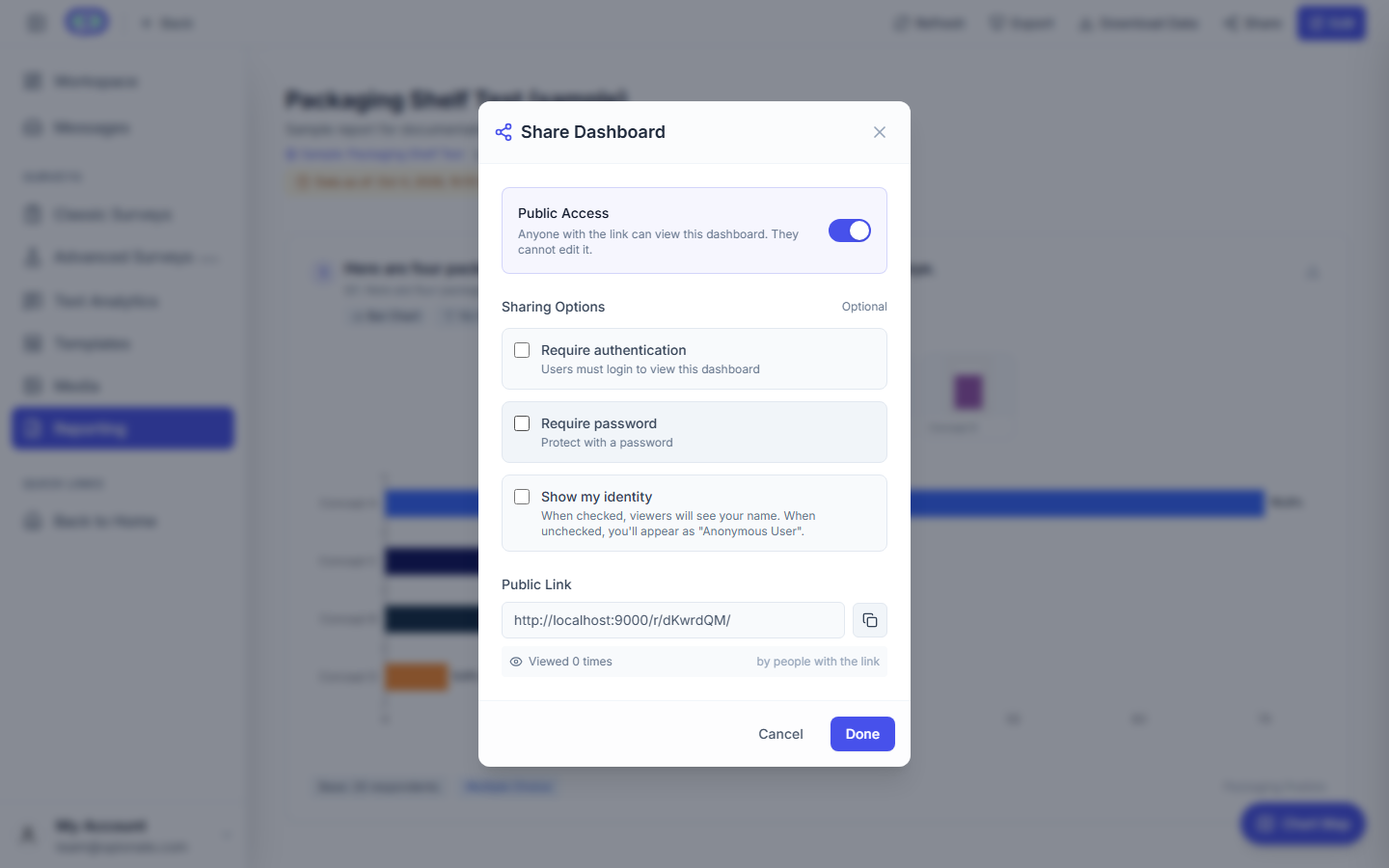
The share modal - a password gate is the simplest meaningful control over who can actually open the link.
Password Protection: The Simplest Meaningful Gate
For most external-sharing situations, a password is the practical middle ground between a fully open link and a full login requirement - it doesn't require the recipient to create an account or remember a username, but it does mean the raw URL alone isn't enough to get in if the link ever gets forwarded beyond the intended recipient. This is worth treating as close to a default for anything containing information you wouldn't want circulating past the specific people it was sent to, and worth skipping only for genuinely public-facing material - a transparency report meant for open, unrestricted viewing, for instance, where a password would just add friction with no real benefit.
Hiding Who Built It
Showing a generic identity instead of an individual name on a public view matters more than it might first seem, particularly for reports going to an external audience who has no ongoing relationship with the specific person who built it. It also reduces an easy, if minor, social-engineering surface - an external viewer who knows exactly who built a report, and has their name attached to it, has a small additional lever for impersonation or unwanted direct contact that a generic or team-level attribution avoids entirely. This is a small, low-effort setting worth treating as a checklist item any time a dashboard is headed outside the organization, not something to remember only after it's already been an issue.
Build a Separate, Purpose-Built Public Dashboard
The single most effective practice for public sharing has less to do with any specific access setting and more to do with what gets built in the first place: rather than taking an internal, working dashboard - built for an internal audience, full of exploratory widgets, draft framing, and internal-only context - and simply flipping it public, build a separate, deliberately curated dashboard specifically for the external audience, containing only the widgets that audience actually needs to see. This matters because dashboard-level sharing controls govern access to the whole dashboard, not visibility of individual widgets within it - there's no way to selectively hide one chart on an otherwise-shared dashboard from a specific viewer, which means the real control point is upstream, in the decision about what to include when the public-facing version is built in the first place, not something to manage after the fact.
When to Turn a Link Off
A public link doesn't expire on its own just because the person it was originally sent to has moved on or the underlying business relationship has ended - it keeps working until someone actively disables it. Building a habit of reviewing active public links periodically, the same way an organization might periodically review who has access to a shared drive folder, catches links that have quietly outlived their original purpose - a client relationship that ended eight months ago, a board member who left the board, a partner integration that was discontinued - all of which can leave a working, forgotten link pointing at current, possibly-updated data with nobody remembering it's still live.
A Worked Example
A market research firm wants to share ongoing survey results with a client on a recurring basis. Rather than granting the client a login to the firm's internal dashboard - which also contains draft widgets, cost and margin notes in a few text blocks, and comparisons against other client engagements - the team builds a dedicated client-facing dashboard containing only the specific charts relevant to that client's project, sets a password shared privately through a separate channel rather than embedded in the same email as the link, and switches the report's identity display to the firm's team name rather than the individual analyst's. When the engagement wraps up six months later, the link is added to a standing quarterly review of active external shares and gets disabled at that point, rather than being discovered still active a year after anyone remembers it exists.
FAQ
Is a password-protected link as secure as requiring a full login?
Not quite - a password can be shared beyond the intended recipient more easily than an authenticated account can, since it doesn't tie access to a specific identity. It's a reasonable middle ground for most external-sharing situations, but a full authentication requirement is the stronger choice for genuinely sensitive material.
Can I hide just one widget from public viewers while keeping the rest of the dashboard shared?
Not at the individual-widget level - sharing controls apply to the dashboard as a whole. The practical way to control what an external audience sees is building a separate, purpose-built dashboard containing only what that audience needs.
How often should I review active public links?
There's no fixed rule, but tying it to a recurring calendar event - quarterly, alongside another routine review - is more reliable than expecting anyone to remember it as an ad hoc task, since forgotten links are exactly the kind of thing that don't naturally surface on their own.
Should every external dashboard use a password?
For anything not meant to be fully open to the public, yes, as a reasonable default. It's worth skipping only for material that's genuinely meant to be openly accessible, where a password would add friction without a real corresponding benefit.
For more on presenting results clearly to any audience, see Writing Survey Reports People Act On and Common Dashboard Mistakes That Quietly Undermine Trust.